


Location trackers have matured into essential tools for everyday life, helping users find lost keys, bags, bikes, and more. This year, Apple’s AirTag 2 stands out as one of the most talked-about options for those embedded in the Apple ecosystem. With improvements to tracking accuracy, privacy protections, user interface, and integration with Apple devices, AirTag 2 is positioned as a leading choice for personal item tracking. This comprehensive guide explains what AirTag 2 offers, how it compares to other trackers, its key features, pros and cons, real user experiences, and whether it is worth buying this year.
By the end of this guide, readers should have a clear understanding of how AirTag 2 fits into their lives, how it performs relative to competing products, and how to make the most of its capabilities.
What Is the AirTag 2
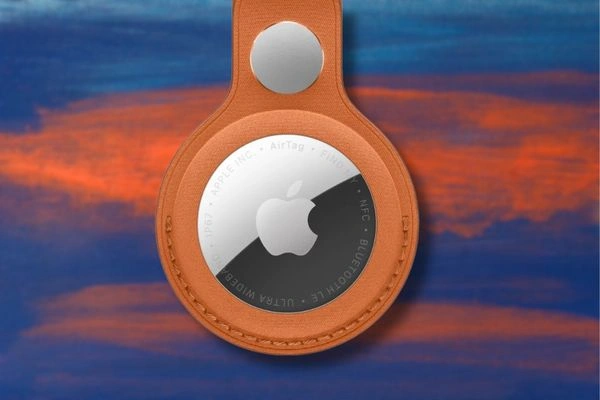
The AirTag 2 is the second generation of Apple’s Bluetooth-based location tracker. Designed to help users locate everyday items through the Find My app, AirTag 2 builds on the original AirTag’s success while introducing enhancements in range, accuracy, battery life, and privacy protections.
Apple first released the original AirTag in 2021 and quickly saw widespread adoption due to its simplicity and deep integration with iPhones, iPads, and Macs. In 2026, AirTag 2 refines the formula with updated hardware, stronger performance in crowded wireless environments, and tighter software integration with the broader Apple ecosystem.
AirTag 2 works by connecting to a user’s Apple device using Bluetooth and the Find My network. When an AirTag is misplaced, users can check the Find My app to view its last known location or receive step-by-step directions when it’s in range. Leveraging millions of Apple devices worldwide, the Find My network enables secure and anonymous location updates from nearby devices.
How Tracking Technology Has Evolved
Tracking technology has advanced rapidly in recent years. Early Bluetooth trackers offered basic proximity alerts and short-range detection. Over time, manufacturers added features such as ultra-wideband (UWB) direction-finding, long-range connectivity, mesh network support, and smarter software algorithms to enhance accuracy.
Apple’s AirTag lineup popularized the use of the Find My network as a crowd-sourced location service. This means that even when a tagged item is out of Bluetooth range, nearby Apple devices can relay its position securely back to the owner. Privacy protections prevent third parties from accessing location data, and AirTag 2 strengthens these protections with updated firmware and near-field communication (NFC) enhancements for lost mode identification.
Other major brands have entered the market with competitive offerings, most notably Samsung’s Galaxy SmartTag 2, Tile’s latest trackers, and Chipolo’s Bluetooth tags. These alternatives provide multi-platform compatibility in some cases, though none match the breadth of Apple’s ecosystem integration for iOS users.
Key Features of AirTag 2
Understanding the core features of AirTag 2 helps determine whether it is worth purchasing. Below are the most important capabilities that define the device.
Precision Finding With Ultra Wideband
AirTag 2 uses Apple’s UWB technology to deliver Precision Finding, which offers accurate, real-time directional guidance when an AirTag is nearby. Using the iPhone’s camera, accelerometer, and gyroscope together with UWB signals, Precision Finding can direct a user to a misplaced item with remarkable accuracy. This feature works best on iPhone models equipped with the UWB-capable U1 chip, such as iPhone 15 Pro and later.
Enhanced Find My Integration
AirTag 2 integrates seamlessly with the Find My app, allowing users to view item locations on a map, play a sound from the AirTag to help locate it nearby, or place it in Lost Mode. When in Lost Mode, anyone who taps the AirTag with an NFC-enabled device can view the owner’s contact information if the owner has provided it. Integration with Siri enables voice-triggered tracking as well.
Improved Battery and Durability
AirTag 2 offers strong battery life, with replaceable CR2032 batteries that can last up to a year under typical usage. The tracker is water- and dust-resistant, rated IP67, making it suitable for everyday carry and semi-outdoor use. The replaceable battery ensures that users do not need to dispose of the tag prematurely due to power depletion.
Privacy and Security Enhancements
Apple places strong emphasis on privacy. All location tracking is encrypted, and Apple devices that help locate a user’s AirTag do not store or share personal data. Anti-stalking protections prevent unknown AirTags from tracking users without consent. AirTag 2 builds on these protections with updated alerts that notify iPhone users if an unknown AirTag is moving with them over time.
Accessory Ecosystem
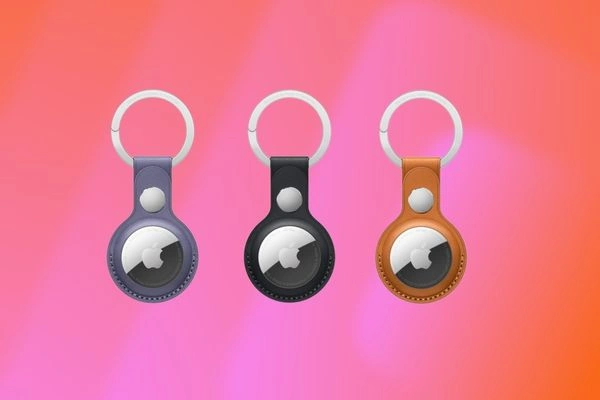
AirTag 2 does not include a key ring or attachment in the box, so users typically purchase accessories such as key rings, loops, luggage tags, or adhesive mounts. Apple and third-party brands like Belkin, Nomad, and Spigen offer a wide range of holders that suit different use cases, including wallets, backpacks, cameras, and even pet collars.
Comparing AirTag 2 With Other Trackers
Users have several tracker options. Evaluating how AirTag 2 compares to alternatives helps determine its value.
AirTag 2 Vs Samsung Galaxy SmartTag 2
Samsung’s Galaxy SmartTag 2 targets Android users and integrates with Samsung’s SmartThings Find network. Both trackers support UWB for precise direction finding and rely on crowd-sourced networks to update locations.
SmartTag 2 works best with Samsung Galaxy phones, particularly models with advanced sensors and SmartThings support. In contrast, AirTag 2 excels for iPhone users due to deep Find My integration. SmartTag 2 may offer additional automation features within SmartThings, such as triggering smart home routines when a tag enters a zone.
AirTag 2 Vs Tile Trackers
Tile trackers have long been popular cross-platform options. Tile’s ecosystem supports both iOS and Android, and its trackers come in various form factors, including adhesive tags and card-style designs suitable for wallets.
AirTag 2 offers superior ecosystem integration for iPhone users and generally more accurate location tracking due to Apple’s vast Find My network and UWB. Tile’s key advantage lies in platform flexibility, making it a strong choice for households with mixed iOS and Android devices.
AirTag 2 Vs Chipolo Trackers
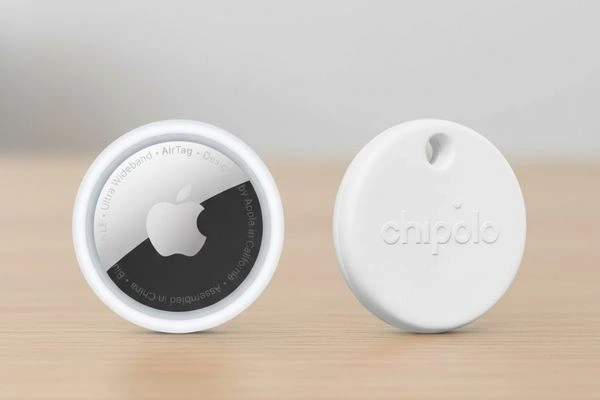
Chipolo produces Bluetooth trackers with strong app support, including out-of-range notifications and community-based location features. Like Tile, Chipolo works on multiple platforms. However, their network coverage is smaller than that of Apple and Samsung, which may affect recovery rates for lost items.
Real World Use Cases
AirTag 2 shines in several everyday scenarios. Below are examples of how people use the tracker:
Finding Lost Keys
One of the most common uses for AirTag 2 is locating keys. Users attach the tag using a key ring and link it to the Find My app. When keys go missing, the app shows the last known location, and Precision Finding can guide users directly to them.
Tracking Luggage
Airport travel can be stressful, and AirTag 2 helps reduce the anxiety of lost luggage. Users place a tag in their suitcase and check its location through the Find My app. If luggage is misplaced, the app may show its movement, enabling travelers to coordinate with airport staff.
Locating Backpacks And Bags
Students and commuters place AirTag 2 inside backpacks, gym bags, or purses. The tracker can help users find misplaced bags in crowded environments or even recover items that have been stolen and left within range of another Apple device.
Monitoring Gadgets And Gear
Photographers and hobbyists often attach AirTag 2 to cameras, tripods, or drones. This provides peace of mind when gear is left in vehicles or public spaces.
Setting Up And Using AirTag 2
AirTag 2 has been designed with ease of use in mind. The setup process involves a few simple steps:
- Activate the Tag: Once the AirTag is powered on, bring it near an iPhone or iPad, and the device will automatically recognize it.
- Name and Assign: Choose a label such as “Keys,” “Backpack,” or a custom name to assign the tag to a specific item.
- Check in Find My: The item appears in the Find My app, where users can see its location, enable Lost Mode, or play a sound to find it nearby.
Lost Mode allows the owner to enter contact information so that if someone else finds the tag, they can tap it with any NFC-enabled device to view the information if it’s shared.
AirTag 2 Accessories Worth Considering
AirTag 2 works best with the right accessories, and many brands offer high-quality attachments.
Belkin Secure Holder With Key Ring
Belkin’s holder provides a sturdy key ring attachment and secure enclosure, keeping the AirTag in place even during frequent use.
Nomad Rugged Strap
Nomad’s rugged strap is ideal for outdoor gear, such as backpacks or bicycles. Its robust design withstands wear and tear.
Spigen Valentinus Wallet Card Slot
Spigen’s wallet accessory combines a card slot with a secure AirTag holder. This design is useful for people who want a minimalist wallet with built-in tracking.
Apple Leather Loop
Apple’s own leather loop offers a premium build and classic look. It integrates seamlessly with the AirTag and complements Apple’s design language.
Price And Value
As of 2026, the AirTag 2 typically retails at a price that reflects its premium integration with the Apple ecosystem. Prices vary by region and whether items are purchased individually or in multi-packs. In many markets, a single AirTag 2 retails for under $40, with discounts or bundled pricing available when buying in sets of four.
When evaluating value, one should consider the strength of the Find My network, the long battery life, and the privacy protections that Apple provides. For iPhone users, especially, AirTag 2 often delivers better overall location-tracking performance than many alternatives.
Privacy And Security Considerations
Privacy is a major selling point for AirTag 2. Apple encrypts all location data and ensures that only the tag’s owner can see its location. Nearby Apple devices that help to locate a lost item do so anonymously and without exposing personal information.
Apple also includes features that prevent unwanted tracking. If an AirTag that is not registered to a user’s Apple ID moves with them over time, iOS devices provide notifications. This mitigates risks that could occur if someone attempts to track another person without consent.
These protections make AirTag 2 a secure choice for people who value data privacy and want reassurance that their tracking tags cannot be misused.
Pros And Cons Of AirTag 2
When considering whether to buy AirTag 2, it helps to summarize the device’s strengths and limitations.
Pros
- Seamless Apple Integration: Works smoothly with iPhone, iPad, and Mac.
- Large Find My Network: Leveraging millions of Apple devices worldwide improves the chances of recovering lost items.
- Precision Finding: Accurate directional guidance when in proximity.
- Strong Privacy Features: Encrypted tracking and anti-stalking protections.
- Affordable And Replaceable Battery: Long battery life with user-replaceable CR2032 cells.
Cons
- Best For Apple Users: Limited functionality with Android and non-Apple devices.
- Requires Accessories: Users must purchase holders or key rings for many use cases.
- No GPS Onboard: Relies on other devices for location updates beyond Bluetooth range.
Is AirTag 2 Worth Buying
For people who use Apple devices regularly, AirTag 2 remains a highly recommended purchase. Its tight integration with the Find My app, accurate locating features, and privacy enhancements make it an effective solution for tracking keys, bags, gadgets, and other valuables. The device’s affordable price point further enhances its value.
However, Android users or those outside the Apple ecosystem may find more value in alternatives such as the Samsung Galaxy SmartTag 2, Tile trackers, or multi-platform Bluetooth devices that offer broader compatibility. While these alternatives often do not match Apple’s coverage and integration, they provide viable options for non-Apple users.
Precision Tracking Made Simple With AirTag 2
AirTag 2 represents a refined evolution of Apple’s location tracking technology. It remains one of the best choices for Apple users who want reliable, accurate, and privacy-focused tracking for personal items. With enhanced precision finding, strong network support, affordable pricing, and a large ecosystem of accessories, AirTag 2 continues to justify its place in many users’ daily routines.
Choosing the right tracker depends on ecosystem preferences, specific use cases, and hardware compatibility. For iPhone users especially, AirTag 2 stands out as a leading option that combines functionality, security, and convenience in a compact package.


